Adventures with Raspberry Pi over a great weekend
Alright, it was better as Mark Twain put it. (also an informal study with Pi)
Alright, it was better as Mark Twain put it. (also an informal study with Pi)
PS: UPDATED for UBUNTU 20.10 - Groovy Gorilla
After having received the 4GB version of Raspberry Pi4 right at the moment I was wrapping up my Friday, nothing felt more energizing for the weekend that was dawning.
Being an enthusiast doesn’t come with obvious ostentatious and gaudy ways to flaunt that tag, it comes, but only with a deep urge to do things — not with an entirely quantifiable objective, but for the sheer pleasure of it! for joy!
My passion for Home automation goes way back to 2015. When I first saw that an Arduino board with a simple C-program could be used to turn on/off a light totally on another side of the world — it was exhilarating! This new understanding enabled my thinking in many ways!
I was surely curious, and more certain I wanted to do more of it! But was limited by time, academics, opportunity, and very certainly knowledge. To understand the intricacies of the whole setup wasn’t easy. And the road ahead was murky as well. It was like walking in dark. I was surely not sure enough which direction to proceed further.
Although “I had given up” at that time — time alone tracks everything. I did give in to the compulsions and needs of the moment, but, very diligently, and very mindfully I continued to strive towards understanding the actual “science” behind these computers.
I learned about computer architectures — how each bit of data flowing from the set of flipflops or so-called registers danced to the instructions passed on by the processor. How the instruction sets made a lot of difference with each iteration of improvement. And finally how x86 architectures made it to the hall of fame! Then it all started to fall in place — operating systems, computer architectures, pipelining, and more!
While this was going at its pace, in 2018, I gave another attempt to see if I could do something more! something more than Arduino! And this time very naturally I selected a “Pi” — “Raspberry Pi Zero W”. Even before I could experiment, I very gloriously failed again. This time I was dumbed down by my limitations in understanding of networks. I was again offered two pills by my fate — both the same “give up now”. Having realized that “protecting curiosity” was much more important than getting away with meager results, I resolved to safeguard each bit of my zeal. But being pushed against a wall, with no choice, I took the “give up now” option. Deep down I assured myself, I would give up for now, but will “resume later”.
As I had mentioned earlier, with time, things fell in place. Eventually, all network protocols started to make sense, and, with effort, I had the delight to experiment with them. I was able to implement them. And having gotten expertise at Kubernetes and Docker, little did I realize I was getting ready for what lies ahead!
It was this dawn — the dawn where my curiosity was awakening. It was the dawn where my knowledge had taken enough shape in a way I could wield it! and this time there was no yielding to compulsions of situation.
My endeavors to shield, shelter, and nourish healthy curiosity finally came towards a point of congruence. It was this weekend I finally offered myself another chance to see if I could accomplish something more satisfying for all the perseverance.
Here, I am listing a few of my experiments and MY observations (of course opinionated by facts )-
- Best Operating System for Raspberry Pi (Desktop Experience) amongst — Raspbian, Ubuntu GNOME, Ubuntu MATE.
- Some useful apps to self-host
- observations and clarities with regards to daily use
Best OS for Raspberry Pi (Desktop Environment)
Raspberry Pi is not your everyday laptop kind. It is built on top of an ARM — — architecture a clear distinction from an ordinary powerful PC we are otherwise habituated to, which are often based on x86 style. To put it in the simplest terms Raspberry Pi is powerful, but not as much as your everyday PC/Mac’s (by taking into consideration it is 2020). So, IT CANNOT replace a desktop at your home (Unless you are a very light user). IK, that was harsh for a Raspbian fan. While that is very true according to my experience, it is still one of the, if not the best — general-purpose machine for Home automation and other amazing purposes. In my honest opinion, it is the most affordable mini-server anyone can get.
So, for a Desktop Environment, while it is true that Raspberry PI OS serves the vast majority, there is a very strong alternative out there — Ubuntu. Please note Ubuntu is certified for Raspberry PI.
With Ubuntu 20.10 — Groovy Gorilla edition, there is a special focus on Raspberry pi. It is worth noting that there have been GREAT IMPROVEMENTS. One noticeable improvement was the CPU load. The average CPU consumption AT IDLE STATE is now only at 25% compared to the earlier observation of 60%–70% with Ubuntu 20.04. There also has been a great improvement in RAM consumption as well, and Groovy Gorilla really tries to keep it low with only consuming around and under 1GB of memory.
This makes the overall experience way smoother, but, still, Ubuntu MATE is considerably smoother than other alternates.
To summarize — my choice is— Ubuntu MATE, but, default GNOME is doing much better with Ubuntu 20.10 compared to earlier 20.04.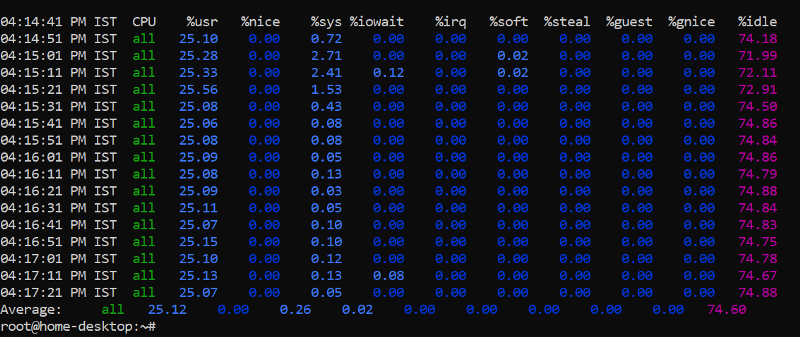
Applications tested with —
To have tested the above OS’es I had to choose a certain set of applications, and, as an enthusiast of a special cult, those who enjoy self-hosting and feel empowered by that, I choose the following list —
- Pi-Hole (obviously)
- NextCloud
- an FTP server
- Nginx — with static local webpage
- Portainer
- Gotubecast
Also, I tried playing Youtube videos in all the above OSs but, I felt it was the best in Ubuntu MATE. Please note, all the aforementioned applications were working fine on all three OS’es, but, with some sluggishness on Ubuntu
PiHole
After being annoyed by Youtube Ads beyond any possible levels of tolerance, I thought to write a custom Nginx module to block traffic dynamically by use of ML logic, but, I stalled it for some other time, and went ahead with a DNS based approach, and, amongst the many available choices, an obvious one was PiHole. Because my router allowed me to change DHCP settings, I let PiHole manage my DHCP as well.
After setting a static IP (locally) for my Raspberry Pi, and installing Pihole with one command, I went over to the setup screen and selected defaults.
And, added at least a dozen of ad-lists blocking over 2 million lists
NextCloud
This is yet another amazing self-hosted application that has a Windows/Linux/MAC/WEB/Android client that is very easy to use. In brief, this can turn your Pi+Pendrive into a tiny local cloud storage server and more. I was surprised that it had a wide range of integrations, even with JIRA and GIT!
Set up was very easy, all it took was just a docker command and a volume (ext4 formatted Pendrive) attached to its container. It is really important to get it formatted in ext4.
FTP server
I tried to see what were the differences between FTP, SFTP, and FTPS, and after inferring that the differences were very huge, I decided to go with a normal FTP server (because I was anyway sure to use NextCloud). But, overall, an FTP server is very much possible. It was more than surprising to see that there wasn’t even one good FTP CLIENT for android on PlayStore or one which was baked into the defaults. Anyway, it works!
I followed this tutorial to get it sorted!
Nginx
For me, PI was my experiment box. It was that machine I would want to serve a tiny website from. With that goal in mind, Nginx was obvious. Installation was yet again a docker command alone. and well, it works!
Portainer
Having worked upon Nirmata and Kubernetes, I wondered why I never heard of this amazing thing! Portainer is the best app anyone can have on their Raspberry PI — if you want to keep experimenting with various docker apps. It gives a beautiful view of all docker containers installed on the standalone Raspberry PI. While it can do many other things, This ability to manage other containers from this one singular amazing dashboard is very useful! and little more than essential if you have too many containers.
Portainer can also be started with just one command — a docker run!
Gotubecast
As I had my Pi connected with my TV which I was otherwise using to cast Youtube Videos, now that my PI was running, I had to find ways to let my family members continue using without hindrances. This tiny program does that same thing with very little hacks. While the initial set-up is still needed, well, this is a great way!
This piece of software made my time on Pi worthwhile without disturbing others!
Verdict!
While two weeks might be too less a time to arrive at a rock-solid conclusion, well, it is not a Ph.D.! It is of-course something done in leisure.
With the promise and power of Ubuntu and the “elegance” that comes with Ubuntu-MATE, I think that is best for the desktop environment, and, it is also just super awesome for hosting the aforementioned applications.
Now, although the main aim to buy a Pi would be to use the GPIO pins, I didn’t get a chance yet. I hope that I can get a chance to resume that bit of experimentation soon.
It is this great mixture of passion, perseverance, knowledge, and most of all, a healthy curiosity — this is the recipe that yields satisfaction! and, with luck, it is surely good enough as a mantra for success as well!
Overall, Pi is a great deal!