Python-Flask, WSGI, Gunicorn, Docker, Kubernetes — magic soup with Philosophers Stone
The goal of this article is to explain how all the aforementioned components fall in-line with each other — in the most jaw dropping way…
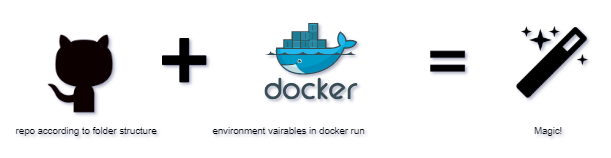
Configuration, dependencies, application names, repo paths, all — pluggable
The goal of this article is to explain how all the aforementioned components fall in-line with each other — in the most jaw dropping way possible.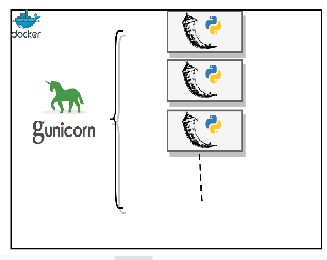
Prerequisites:
- Follow project folder structure and provide configurations as required.
- get your environment ready
- RUN!
Basic, Background and why —
- Flask is too much of freedom, paving way to anarchy inside your mind
- For a beginner, taking Flask/Django to Prod is always new, especially if you are coming from JAVA, nah, it aint gonna be easy. You would keep looking for JAR’s, Tomcat servers, what not!
- WSGI and Gunicorn — these words are everywhere, but what do they mean to the fullest?
- Even if i manage to understand all the above, how am I going to deploy it? On a server? Running it as a process? (If you are doing this, please move ahead from these legacy approaches)
- How about Dockerizing it? and then? how can I maintain standard across environments?
Jargons:
- Flask — a mirco framework in Python, that has set world on fire with its minimalist approach. It is NOT built for production, but, nonetheless, it has very much been the arch rival of django since its inception. you can find a sample here!
- WSGI — a simple and universal interface between web servers and web applications or frameworks: the Python Web Server Gateway Interface (WSGI). More or less, a standard — one that defines how the server side invokes a callable object that is provided by the application side
- gunicorn — a WebServer built in Python to according to WSGI standards.
- Docker — It is a containerization Technology, simply put it is a combination of isolation and control on resource utilization. It is analogical to a VM, but in a very stripped down sense. Ideally, containers are for Stateless application, which do not require assurances of persistence.
- Kubernetes — a rather simpler container Orchestration tool.
Solution in brief:
- Follow a stringent folder structure
- Push all code to repository as per our folder structure
- Use one base image for almost all our requirements.
- Dynamically pass values of to Docker container as environment variable.
As you skim through this article, you shall be starting to admire how far we have come as an industry, as technology, as DevOps, as CICD, as Cloud Native and most of all, how effortlessly we are running micro-services and on Kubernetes! How did we end up here?
The idea of this article is not to explain any of the aforementioned things in more detail than to connect these dots and deploy a production grade Flask Micro-service with Gunicorn.
There always is some standardization required, especially if you are running against time. In my experience, or, in pursuit to figure out how fast I can move ahead from prototyping to production, I have seen that each time I try to resolve an issue, something greater shows up, questioning my very ability.
There is only one solution to all the above, Exploration, Necessity is the mother of all invention.
What is our folder structure?
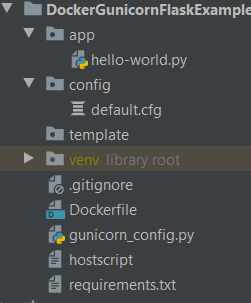
- hello-world.py — is your API/Flask APP.
- default.cfg — is the configuration file for application
- gunicorn_config.py — Configuration for GUNICORN
- requirements.txt — all application dependencies that use “pip install ”
What are the environment variables this Image expects?
- git_url — Git url to clone (can include username password, check whatever works)
- git_branch — branch which you want to pull!
- project_name — Name of your project
- port_addr — port on which you want to expose your service outside inside Container , for gunicorn
- pyconf — ABSOLUTE path to your configuration file, if you are loading configuration from any configmap/repo, you may just edit this one variable
- python_app — file inside app folder that you want to run — “dont give xyz.py, just xyz would do!”
HOW TO RUN :
Pass all the aforementioned environment variables to docker run command:
“docker run -itd -p 5000:5000 -e git_url=https://github.com/vaddisrinivas/dockergunicornflasktemplate -e project_name=dockergunicornflasktemplate -e python_app=hello-world -e pyconf=/app/dockergunicornflasktemplate/config/default.cfg -e port_addr=5000 -e git_branch=master imvegeta/excalibur”
Now that we have our excalibur running, let us look at what we are accomplishing , the Bigger Picture! #futurescope — Heres what we are going to do in the coming time!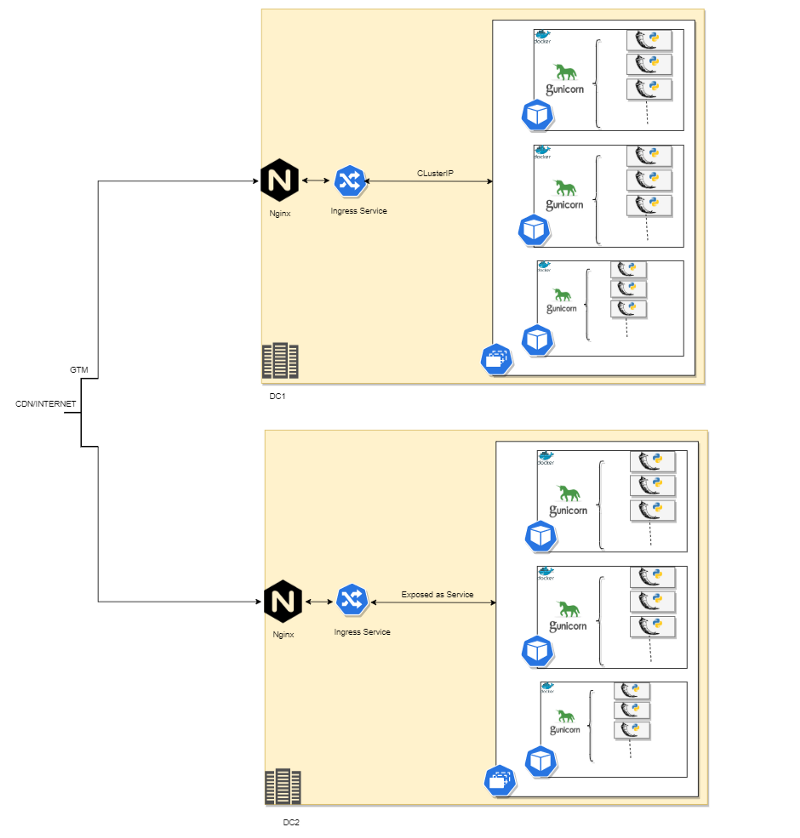
Extending it to Kubernetes will be the subject of next article!
Click here for the Docker Image!
You can PLAY WITH DOCKER HERE! just use the run command in a new instance created from here!
Please let me know what you think would be the easier way of doing things! Also do share what you think of this article!
Thanks for your time readers!